
THE CINEMASTERY JOURNAL
Video Editing Tips: Turning Chaos into Cinematic Harmony
26 February 2026 · 14 min read
You stare at the timeline, a chaotic jumble of clips. Each cut feels arbitrary, a mechanical act rather than an artistic choice. Your story is in there, buried beneath clunky transitions and a rhythm that feels… off. You know the software, you’ve watched the tutorials, but your edits lack the soul, the visceral punch of true cinema. This is where the true art begins. We’re not here to offer another dry list of software shortcuts; we’re here to share foundational video editing tips forged in the fire of cinematic storytelling-the principles that turn chaos into harmony.
Prepare to go beyond the technical and into the philosophical heart of the edit. In this guide, you will learn to manipulate time, to craft a rhythm that dictates emotion, and to understand the narrative purpose behind every single cut. It’s time to stop merely assembling footage and start sculpting a powerful, seamless experience for your audience. It’s time to develop a signature style that is undeniably your own.
Key Takeaways
- View editing as the final, crucial rewrite of your story, where every single cut must be motivated by narrative intent.
- Master the invisible art of pacing to manipulate time itself, building visceral tension or serene calm with the duration of each shot.
- Discover professional video editing tips that transform a disciplined workflow from a tedious task into the very foundation of creative freedom.
- Elevate your work beyond a simple sequence of clips by wielding color and sound to sculpt the mood and emotional core of your film.
Table of Contents
- The Foundation: Editing as the Final Rewrite
- Mastering Rhythm and Pacing: The Heartbeat of Your Film
- The Editor’s Workflow: From Chaos to a Polished Cut
- Polishing Your Edit: The Magic of Color and Sound
The Foundation: Editing as the Final Rewrite
Forget what you’ve been told. Editing is not the act of assembling pieces; it is the final, brutal, and beautiful act of writing the story. The raw footage is merely a collection of possibilities, a chaotic library of moments. The true craft of Film editing is about turning that chaos into harmony, transforming raw material into a visceral emotional experience. You are the final author. You must learn to watch your footage not as the person who shot it, but as the audience who will feel it. This is the first and most vital of all video editing tips: become the guardian of the film’s heartbeat and pacing.
Finding the ‘Why’: The Motivation Behind Every Cut
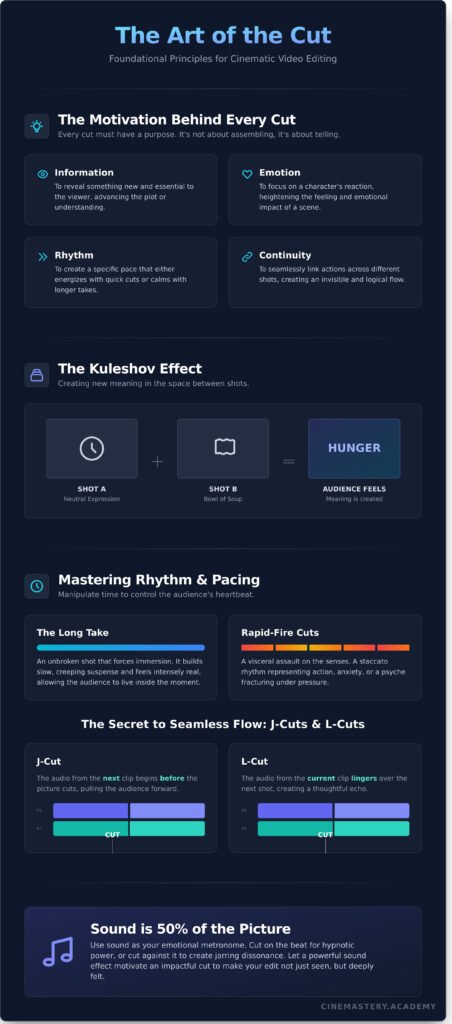
Every single cut must be an answer to a question. It must be motivated. A cut for the sake of cutting is a distraction that shatters the audience’s immersion. Ask yourself why you are cutting at this precise moment. Your reason will almost always fall into one of four categories:
- Information: To reveal something new and essential to the viewer.
- Emotion: To land on a character’s reaction and heighten the feeling of a scene.
- Rhythm: To create a pace that either energizes or calms the audience.
- Continuity: To seamlessly link actions and create an invisible flow.
The Kuleshov Effect: Creating Meaning Between Shots
A shot in isolation has limited meaning. Its true power is unlocked by the shot that precedes it and the one that follows. This is the magic of the Kuleshov effect. A neutral face can express profound sadness when followed by a shot of a coffin, or deep hunger when followed by a bowl of soup. As the editor, you wield this psychological principle to guide the audience’s thoughts and emotions, creating meaning that exists only in the space between two images.
Your Timeline as a Canvas, Not a Container
Your editing timeline is not a rigid container you simply fill with clips in chronological order. It is a canvas. Your footage is the clay. Do not be afraid to deconstruct, to shatter a scene and rebuild it from nothing to serve the narrative. This is where you manipulate time itself, stretching a moment for tension or compressing a day into seconds for impact. Embrace the power to find the film’s true form in the edit suite.
Mastering Rhythm and Pacing: The Heartbeat of Your Film
Forget the software. Forget the plugins. The most powerful, invisible tool you possess as an editor is time itself. Pacing is the art of manipulating that time-of controlling the audience’s very heartbeat. It’s where you turn the raw chaos of footage into a visceral, emotional harmony. Through the deliberate duration of your shots and the cadence of your cuts, you can build unbearable tension, create profound calm, or induce a state of pure panic. The key is to never be monotonous; let the energy of the story dictate your rhythm and keep the viewer utterly captivated.
The Power of the Long Take vs. Rapid-Fire Cuts
This is the fundamental duality of cinematic time. A long, unbroken take is an act of immersion. It forces the viewer to live inside a moment, to breathe with the character, building a slow, creeping suspense that feels intensely real. In contrast, rapid-fire cuts are a visceral assault on the senses-a staccato representation of action, anxiety, or a psyche fracturing under pressure. True mastery lies in their juxtaposition; pulling an audience from a meditative long take into a sudden storm of cuts creates an impact that is impossible to ignore.
‘J-Cuts’ and ‘L-Cuts’: The Secret to Seamless Flow
Every cut is a potential break in reality. Your job is to make it feel like anything but. J-Cuts and L-Cuts are the secret language of seamless editing, creating a subconscious audio bridge between shots. With a J-Cut, the audio from the next clip begins before the picture cuts, pulling the audience forward. With an L-Cut, the audio from a shot lingers over the next, creating a thoughtful echo. Mastering these are among the most excellent video editing tips for turning disjointed clips into a single, breathing narrative.
Cutting to Music and Sound: Your Emotional Guide
Sound is 50% of your picture, and it is the metronome for your edit. Cutting precisely on the beat of a musical score can create a hypnotic, powerful synergy between sight and sound that drives the emotion home. But do not become its slave. An artist knows when to cut against the rhythm to create a jarring, unsettling dissonance. Let a powerful sound effect-a gunshot, a door slam, a sudden silence-motivate a hard, impactful cut, making your edit not just seen, but deeply felt.
The Editor’s Workflow: From Chaos to a Polished Cut
Forget the myth of the tortured artist lost in a sea of clips. True creative freedom in the edit suite is born from unwavering discipline. Before you make a single cut, you must bring order to the chaos. Organize your footage, label your bins, and create a sacred workspace. This initial ritual isn’t tedious; it is the essential first step in transforming raw reality into a visceral cinematic experience. A structured workflow doesn’t restrict you-it unleashes you.
The Three-Pass System: Assembly, Rough, and Fine Cuts
One of the most powerful video editing tips we can offer is to abandon the idea of perfecting your film in one go. You must work in layers, sculpting the story with each pass. This is the path from a jumble of footage to a seamless narrative.
- The Assembly Cut: This first pass is the skeleton. Lay out every scene in its scripted order. Ignore pacing, ignore performance nuance, ignore everything but the core structure. Your only goal is to get the story’s bones onto the timeline.
- The Rough Cut: Now, you add the muscle. This is where the edit begins to breathe. You will trim the fat, refine the pacing, and experiment with shot selection. It’s a messy, intuitive process where you find the film’s heartbeat.
- The Fine Cut: The final pass is the skin. Here, you become obsessed with detail. You perfect every cut, smooth every transition, and tune every single moment until it sings. This is where good becomes unforgettable.
Beyond the Hard Cut: Using Transitions with Purpose
The hard cut is your most powerful tool-the invisible stitch that holds your film together. Use it as your default. Other transitions are cinematic punctuation; use them sparingly and with intent. A dissolve can beautifully signal the passage of time or link two disparate ideas thematically. A fade to black is a full stop, a breath before a major shift or the final, resounding end. Never use a transition as a crutch; use it as a statement.
The Art of Trimming: Why Every Frame Matters
The difference between a clunky edit and a seamless one often lies in a single frame. Learn to “shave” frames from the head or tail of a clip to perfect the rhythm of a cut. Tighten dialogue by surgically removing dead air to build tension, or do the opposite-add a few frames before a cut to let a crucial look or emotional beat truly land with your audience. Every frame is a decision, and mastering this discipline is a core philosophy we teach at Cinemastery Academy.
Polishing Your Edit: The Magic of Color and Sound
A sequence of clips is not a film. It’s a skeleton waiting for a soul. The true alchemy of editing happens in the final polish, where you move beyond simple assembly and begin to manipulate the senses. This is where you, the editor, become an artist. Color grading dictates mood, sound design builds reality, and music provides a direct, unfiltered line to the heart of your audience. This is where chaos is transformed into a visceral, emotional experience.
An Introduction to Cinematic Color Grading
Color is the subconscious language of your film. It is not about “correcting” an image; it is about infusing it with emotion. Understand the profound impact of your palette: warm, golden tones can evoke nostalgia and comfort, while cool, sterile blues can create a sense of isolation and dread. Use color to command the viewer’s attention, pulling their eye to the vital details in the frame. A consistent grade unifies your project, transforming disparate shots into a single, cohesive world with its own visual signature.
Sound Design 101: Building a World with Audio
They say sound is 50% of your picture. This is an understatement. Sound is the unseen universe your visuals inhabit, the element that makes them believable. Without it, your images are just a silent, hollow ghost. Among the most powerful video editing tips is to build your audio in layers:
- Ambiance: Layer subtle, environmental sounds-the hum of a refrigerator, distant traffic, the whisper of wind-to create a palpable sense of place and reality.
- Foley & SFX: Add specific, impactful sound effects to ground on-screen actions. The crisp crunch of footsteps on gravel or the heavy thud of a closing door adds weight and texture.
- The Sound Bridge: Use audio from the next scene before the visual cut. Hearing the roar of a train before we see the station is a powerful, seamless tool for transitioning between worlds and ideas.
Finding Your Voice: When to Break the Rules
You must first master the fundamental rules of editing. Understand pacing, continuity, and structure so deeply that they become instinct. The rules are your foundation, not your cage. Only then can you learn to break them with intention and for a specific, powerful effect. This is the path from technician to author. Develop your unique style through relentless practice and a deep study of the masters. The ultimate goal of these video editing tips is not to make you edit like someone else, but to give you the weapons to edit like yourself. Master the art of editing at Cinemastery Academy and forge your signature style.
Forge Harmony from Chaos: The Editor’s Final Mandate
The edit is where the soul of a film is truly forged. It is the final, silent rewrite where raw footage-the chaos of the shoot-is sculpted into a visceral, emotional experience. By mastering the heartbeat of pacing and the alchemy of color and sound, you don’t just assemble a story; you breathe life into it. These are not mere technical steps; they are acts of creation. Remember that the most powerful video editing tips are those that serve the narrative and elevate emotion, allowing you to craft an experience that is undeniably yours.
But tips are only the beginning of mastery. Taught by industry professionals, our courses guide you through the five core elements of film-Narrative, Cinematography, Editing, Sound & Mise-en-scène-to help you find your unique cinematic voice. Your future in film starts here. Explore our filmmaking courses. The timeline is your canvas. Go create.
Frequently Asked Questions
What is the most important skill in video editing?
The most vital skill is not mastering software, but commanding rhythm. Editing is the heartbeat of your film, the invisible force that dictates pace, tension, and emotional impact. It is the art of knowing precisely when to cut-when to hold a breath, when to accelerate the pulse. This intuition for timing is what separates a mere assembly of clips from a visceral, unforgettable experience. You are not just arranging shots; you are sculpting time itself.
How can I make my video editing more engaging and dynamic?
To forge a dynamic edit, you must embrace contrast. Juxtapose fast-paced sequences with moments of quiet stillness. Manipulate time by varying shot lengths to build and release tension. Use J-cuts and L-cuts to let your audio bleed across edits, creating a fluid, immersive experience where sound leads the eye. This is one of the most powerful video editing tips: don’t just cut the picture, orchestrate a symphony of sight and sound that commands attention.
Should I edit for the story or for the visuals?
This is not a choice; it is the fundamental law of our craft. Story is the soul of your film, and every cut, every transition, every visual must serve it without question. A visually stunning shot that derails the narrative or dilutes emotion is a failure. Your duty as an editor is to be the ultimate storyteller, using the visual language to amplify the emotional core of the narrative. Never sacrifice meaning for a moment of empty spectacle.
How long should a shot be before I cut away?
Banish the stopwatch from your mind. A shot’s duration is dictated by its purpose, not by an arbitrary number. Does it need to convey critical information? Does it need to let an emotion resonate with the audience? A frantic action scene may demand cuts every second, while a poignant moment of reflection might need to linger for ten. Your job is to feel the rhythm of the scene and cut at the precise moment the shot has fulfilled its narrative duty.
What’s the difference between an assembly cut and a rough cut?
The assembly cut is the raw chaos-every single shot laid out in chronological order, a sprawling blueprint of potential. It is the story in its most brutish, untamed form. The rough cut is the first true act of creation. It is where you begin to impose your will, shaping that chaos into a narrative. Here, you start making decisions about pacing, performance, and structure, transforming the raw material into the first recognizable sculpture of your film.
How do I choose the right video editing software for me?
The software is the brush, not the artist. An amateur with the most expensive gear will still create amateur work. The industry standards-DaVinci Resolve, Adobe Premiere Pro, Final Cut Pro-are all profoundly capable. The “right” software is the one you commit to mastering. Choose one, learn its language until it becomes an extension of your own creative impulse, and focus your energy on the art of storytelling, not the endless pursuit of features.
Can good editing save bad footage?
Editing is alchemy, not necromancy. It cannot resurrect a story that was never captured. A masterful editor can manipulate rhythm, salvage performances, and hide technical flaws, turning disorganized footage into something coherent. It can discover a hidden gem within the chaos. But it cannot create emotion, substance, or narrative from a void. Editing can elevate good footage to greatness, but it cannot transform garbage into gold. The foundation must be sound.