
THE CINEMASTERY JOURNAL
What is a LUT? The Filmmaker’s Guide to Color, Mood, & Style
20 February 2026 · 14 min read
It’s a familiar heartbreak for the aspiring filmmaker. You meticulously frame a perfect shot, a moment of pure visual poetry, only to see it captured as a flat, lifeless, digital ghost on your monitor. In a desperate search for that elusive ‘cinematic’ soul, you apply a downloaded lut, and the image shatters-crushed blacks, alien skin tones, a chaotic mess. This is the great lie of modern filmmaking: that art can be reduced to a one-click filter.
Forget everything you think you know. A LUT is not a filter; it is a key. It is the bridge between the technical chaos of a LOG profile and the visceral harmony of a finished grade. In this guide, we will demystify this powerful tool. We will show you the sacred workflow to breathe life into your footage, to master color and mood, and to finally stop imitating the look of others. It’s time to wield color with intent and forge the signature style that will define you as a true filmmaker.
Key Takeaways
- Discover why a LUT is not a simple filter, but a powerful color map that fundamentally transforms your image’s data.
- Master the crucial distinction between Technical and Creative LUTs to build a technically sound and artistically expressive image.
- Uncover the sacred color grading workflow, learning exactly when and where to apply a lut for maximum creative impact.
- Identify the common sins that destroy your image, turning a powerful tool into a weapon of self-sabotage.
Table of Contents
- Deconstructing the LUT: More Than a Filter, It’s a Map
- The Two Faces of the LUT: Technical Conversion vs. Creative Intent
- The Sacred Workflow: Where to Place LUTs in Your Color Process
- The Sins of the LUT: Common Mistakes that Destroy Your Image
Deconstructing the LUT: More Than a Filter, It’s a Map
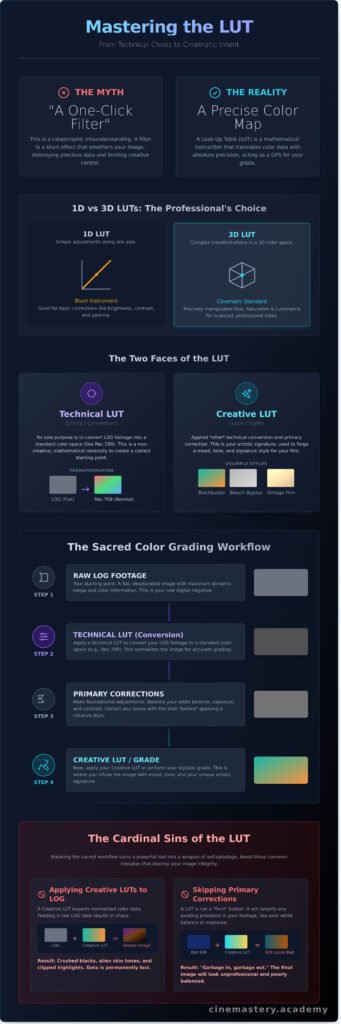
Let’s be brutally clear: a LUT is not an Instagram filter. To compare the two is to compare a master’s brushstroke to a sticker. A filter is a blunt, one-size-fits-all effect that smothers your image. A Look-Up Table, or LUT, is an instrument of precision, a tool of cinematic intent designed to manipulate reality itself.
At its core, a LUT is a mathematical instruction. It’s a digital Rosetta Stone for color, holding a predefined set of rules that tells your software: “When you see this specific color, change it to that specific color.” It’s not a guess; it’s a command. This is why a professional lut can serve as the color GPS for your footage. It provides a precise path, a map to a specific emotional tone or visual world, but you remain the artist in control. Its purpose is singular and profound: to translate color information with absolute precision, transforming raw data into a visceral experience.
The Core Function: Translating Color Data
Every pixel in your footage has an input value-its original color data. A LUT takes that input and remaps it to a new output value, doing this for millions of colors simultaneously and instantly. This transformation is stored in a simple data file, most commonly with extensions you’ll come to know well:
- .CUBE: The industry standard, widely compatible across most editing and color grading software.
- .3DL: Another common format, often used in high-end systems like Lustre.
This remapping is the technical engine behind the magic, allowing you to impose a complex, pre-designed color harmony onto your footage with a single click.
1D vs. 3D LUTs: A Quick, No-Nonsense Breakdown
Not all LUTs are created equal. A 1D LUT is a simple tool, adjusting values along a single axis for basic corrections like contrast, brightness, and gamma. It’s a blunt instrument. The true power lies in the 3D LUT, the undisputed standard for cinematic color work. Instead of a simple line, a 3D LUT uses a three-dimensional color space. This is where the alchemy begins, using a 3D lookup table to manipulate hue, saturation, and luminance with the precision of a master painter. It can target and transform specific colors without destroying others, allowing for the rich, nuanced looks that define professional cinematography.
The Two Faces of the LUT: Technical Conversion vs. Creative Intent
In the realm of color grading, there is one truth that separates the masters from the masses, and it revolves entirely around the Look-Up Table. To the uninitiated, a LUT is a simple filter. A one-click fix. This is a catastrophic misunderstanding. There are two distinct worlds of the lut, and using the wrong one at the wrong time will not just weaken your image-it will shatter its integrity. Professionals understand this duality. They wield both, but always in a sacred, unbreakable order.
The Technical (or Utility) LUT: From Chaos to Harmony
Your journey begins with raw, untamed footage. You shot in LOG, capturing a flat, desaturated, almost ghostly image. This isn’t a mistake; it’s a canvas of pure data, pregnant with dynamic range. Before you can paint, you must prime this canvas. This is the domain of the Technical LUT. Its sole, uncompromising purpose is to convert that LOG chaos into a standardized color space like Rec.709. It translates the data into a visually accurate starting point. This is not a creative choice. It is a mathematical necessity-the act of turning chaos into harmony, creating the foundation upon which all artistry is built.
The Creative (or Look) LUT: Forging Your Signature Style
Only when your image is corrected and balanced do you unleash the Creative LUT. This is your weapon of choice, your signature brushstroke. This is where you forge a visceral mood and a distinct emotional tone. Want the sun-scorched deserts of a modern western or the cold, cyan-infused dread of a sci-fi thriller? A creative LUT is how you get there. It’s the tool that imparts:
- Iconic looks like the teal-and-orange blockbuster feel.
- The nostalgic grain and color science of classic film emulation.
- Harsh, high-contrast styles like a bleach bypass effect.
But remember, this is an artistic layer applied after the foundational work is done. Understanding this workflow is the key to grasping how LUTs improve videos without destroying them. It’s the final, transformative touch that elevates your footage from a simple recording into a piece of cinema.
The Sacred Workflow: Where to Place LUTs in Your Color Process
A LUT is not a magic button. It is a powerful tool, but like any tool, it demands respect and a proper place in the sacred ritual of color grading. To throw a LUT onto raw footage is to build your temple on sand. The order of operations is everything; it is the path that transforms a flat, lifeless image into a visceral, cinematic experience. Get it wrong, and you shatter your dynamic range, locking yourself out of the very creative freedom you seek.
Follow this workflow to turn your raw footage into a polished, intentional image.
Step 1: Primary Correction (The Foundation)
Before a single LUT touches your timeline, you must first find the image’s truth. This is the foundational act of primary correction. Here, you balance the chaos-taming wild exposures, setting the correct white balance, and establishing a baseline contrast. Your goal is to create a neutral, clean canvas and ensure every shot in a scene feels like it belongs to the same world, the same moment.
Step 2: Apply the Technical LUT (The Conversion)
If you’ve shot in LOG, your footage holds immense potential, but it looks washed out. This is where you apply a technical, or conversion, LUT. Its sole purpose is to convert that flat LOG data into a standard color space (like Rec.709), giving you a ‘normal’ starting point. In DaVinci Resolve, this is often your first node. Understanding the different types of look-up tables is critical, and this comprehensive guide to LUTs from MasterClass provides an excellent foundation. This step isn’t creative; it’s a technical translation, preparing your footage for the artistry to come.
Step 3: Secondary Correction & Creative Grade (The Artistry)
With a balanced image, the real work begins. This is where you, the artist, take control. Secondary corrections are your scalpel, allowing you to isolate and manipulate specific elements. Make the sky a deeper, more menacing blue. Push warmth into skin tones to enhance their vitality. Use power windows, curves, and qualifiers to sculpt the light and guide the viewer’s eye. This is not about correction; this is about creation.
Step 4: Apply the Creative LUT (The Final Polish)
Only now, at the end of the process, do you consider a creative LUT. Think of it as a final varnish on a painting. You can use it as a starting point for your look, but it should never be the entire look. Apply your chosen creative lut and, most crucially, dial back its intensity. The goal is to let the LUT serve your grade, not define it. It should enhance the mood you’ve meticulously crafted, not bulldoze it with a generic, one-click preset.
The Sins of the LUT: Common Mistakes that Destroy Your Image
A powerful tool used incorrectly becomes a weapon of self-sabotage. In the hands of a master, a LUT carves light and emotion into a masterpiece. In the hands of the undisciplined, it hacks away at the soul of your image, leaving a trail of digital destruction. These are not mere technical errors; they are the cardinal sins of color that separate the amateur from the artist. Learning to avoid them elevates your craft instantly.
Sin #1: Applying a LOG LUT to Standard Footage
This is the most common and catastrophic mistake. You are forcing two different color languages to speak to each other, and the result is a digital scream. LOG footage is flat and desaturated, designed to hold immense data. Standard (Rec.709) footage is already ‘finished.’ Applying a LOG transform to it violently crushes your blacks, clips your highlights, and pushes saturation into a garish, broken nightmare. Always match your LUT to your source footage’s color profile.
[Visual example showing a standard image on the left, and the same image with a LOG LUT incorrectly applied on the right, resulting in extreme contrast and saturation.]
Sin #2: Grading After the Creative LUT
This is like painting a beautiful mural and then trying to spackle the wall beneath it. A creative LUT has already ‘baked in’ its opinionated color decisions, fundamentally remapping the data of your image. Attempting to perform major corrections afterward is a battle against your own work. You are stretching and pulling pixels that have been locked into place, inviting digital banding, ugly artifacts, and colors that fall apart under pressure. The creative LUT must be one of the final strokes, not the foundation.
Sin #3: Over-Reliance and the ‘One-Click’ Myth
The most insidious sin is believing a preset can replace your vision. A LUT is not a substitute for understanding the profound language of color theory and emotion. Relying on it as a ‘one-click fix’ is an abdication of your role as a filmmaker, dooming your work to the sea of homogeneity where all films look the same. Use a LUT as a spark of inspiration, a single note in your symphony-but you must be the conductor. Your signature style is forged in the choices you make, not the presets you download.
Learn to master color, not just presets. Explore Cinemastery.
From Color Map to Cinematic Masterpiece
You now understand the truth: the lut is not a mere filter to be slapped onto your footage. It is a precise map of color, a powerful tool for translating technical data into creative intent. Mastering this distinction-and its sacred place within your workflow-is the first step to moving beyond amateur mistakes and into the realm of intentional, visceral filmmaking.
But a single tool, no matter how powerful, does not make the artist. True mastery is about weaving color into the grand tapestry of your narrative. Taught by industry professionals with a unique artistic voice, Cinemastery is where you move beyond technical rules to master the art of visual storytelling. Here, you will command the 5 core elements of filmmaking-including color-and learn to orchestrate them into a singular, powerful experience. It’s time to forge a style that is undeniably yours.
Stop chasing presets. Forge your own cinematic vision at Cinemastery.
The world has enough imitation. It is waiting for your voice. Go create.
Frequently Asked Questions
What’s the difference between a LUT and a preset?
Think of a LUT as a universal map for color, while a preset is a set of specific instructions for a single program. A LUT directly transforms RGB values, making it compatible across most video editing software like Premiere Pro, DaVinci Resolve, and Final Cut Pro. A preset, however, only adjusts sliders and settings within its native application, like Lightroom or a specific plugin. A LUT is the pure language of color; a preset is a local dialect.
Can I use LUTs on my iPhone or drone footage?
Absolutely. The power of a cinematic look is not confined to expensive cameras. Modern mobile editing apps like VN Video Editor, CapCut, and LumaFusion fully support the use of .CUBE LUTs. This allows you to apply a consistent and professional color grade to footage from any source. Your vision is the only thing that matters, not the price tag of your gear. Elevate every frame, regardless of how it was captured.
What does a .CUBE file do and how do I install it?
The .CUBE file is the vessel for your color alchemy. It’s a standardized file format that contains the mathematical data to remap the colors of your image from one state to another. To install it in most professional software, you must locate the program’s dedicated LUTs folder. For instance, in Premiere Pro, you would navigate to the Lumetri/LUTs/Creative folder. Once you place the file there and restart the application, your new LUT will appear as a powerful new tool in your color grading panel.
Why do my skin tones look weird after applying a LUT?
A LUT is a powerful but blunt instrument. If skin tones appear unnatural-often shifting towards orange or green-it’s because the LUT was designed for a different starting point, typically flat LOG footage. Applying a LOG-specific lut to standard (Rec.709) footage creates an overly aggressive, destructive transformation. The answer is not to abandon the look, but to master it. First, perform basic corrections, then apply the LUT and use its intensity slider to blend it into your image harmoniously.
Are free LUTs safe to use for professional work?
A true artist judges the result, not the price tag of the tool. Many free LUTs are crafted by exceptional colorists and are perfectly viable for professional, high-stakes projects. However, the digital landscape is also filled with poorly constructed LUTs that can crush details, introduce artifacts, and ruin your image. Your eye must be the final arbiter. Test any LUT rigorously before deploying it. If it achieves your vision without compromising technical quality, it is a worthy weapon in your arsenal.
How do I create my own LUTs?
This is the path to forging your unique visual signature. The process begins after you have meticulously color graded a reference clip in your editing software. Once you have sculpted the perfect look within a tool like Lumetri Color, you can export those adjustments. In the panel’s menu, select “Export .CUBE.” This action captures your entire color grade-the contrast, saturation, and tonal shifts-into a single file you can apply instantly to future projects, cementing your signature style.